
IE Hand Entry Trainer (HET)
$999.00
Multi-sensor hand entry training board. Drops into any COTS enclosure. WiFi instructor dashboard with real-time monitoring, configurable thresholds, and downloadable After Action Reports.
Description
Enclosure-Agnostic Hand Entry Training with Real-Time Sensor Monitoring
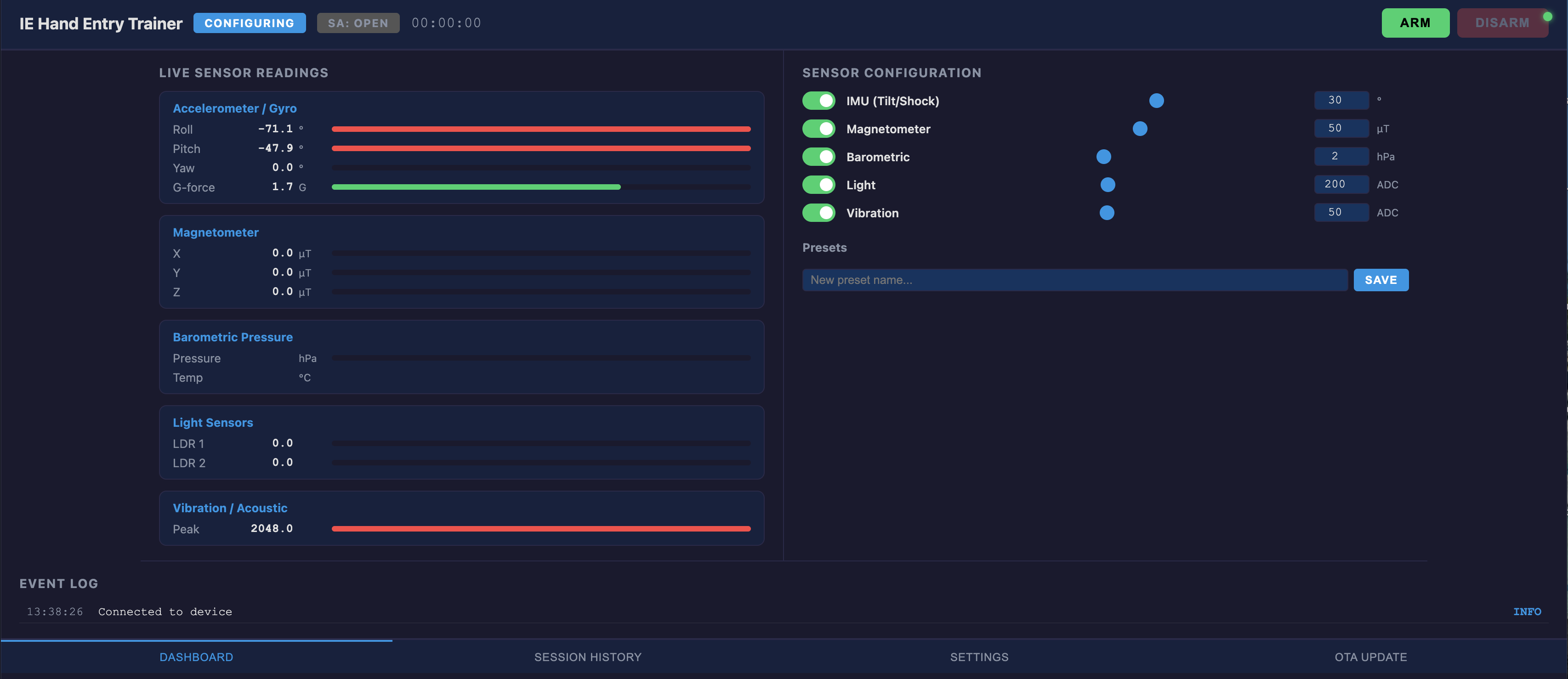
The IE Hand Entry Trainer (HET) is a single sensor board that turns any commercially available container into a scored hand entry training problem. Drop the board inside a toolbox, an ammo can, a pelican case, a backpack — whatever enclosure matches your training objective. The student has to diagnose which sensors are active and perform manual entry without triggering a violation. The instructor monitors everything live from a wireless dashboard on their phone, tablet, or laptop.
Threats in the field do not come packaged in standardized aluminum enclosures with T-slot rails. They come in whatever the builder had available. Your training should reflect that reality. The HET separates the sensor platform from the enclosure so you can build training problems that look and feel like what your operators will actually encounter.
Why This Approach Works
- The enclosure is the training problem, not the product — A training device that only works inside its own proprietary box trains students on that box. The HET goes inside any container, so every scenario feels different. Students cannot develop muscle memory for a single form factor.
- Five onboard sensor categories — Accelerometer/gyro (tilt, shock, vertical lift), magnetometer (magnetic field changes), barometric pressure (sealed container breach), dual light sensors (LDR), and vibration/acoustic detection. Enable any combination.
- Instructor controls everything wirelessly — The board creates its own WiFi network. Open a browser on any device, configure sensors and thresholds, arm the system, and monitor live data. The student has zero visibility into which sensors are active — they have to diagnose the problem first.
- Configurable difficulty — Adjust thresholds per sensor. Wide tolerance for beginners, tight tolerance for advanced operators. Save configurations as named presets and load them instantly.
- Quantitative scoring, not pass/fail — The dashboard shows exactly how much each sensor deviated from baseline. The event log records every violation with the sensor, parameter, measured value, baseline, and threshold. This is data you can use in an AAR.
Built-In After Action Review (AAR)
Every session is logged to an onboard SD card and available through the dashboard. When the instructor disarms the system, the session summary includes:
- Session duration, result (FIRED or clean DISARM), and which sensors were active
- Complete event timeline with timestamps, sensor readings, baseline values, and threshold margins
- Downloadable HTML report — a self-contained file you can save, print, email, or project for a group debrief
The AAR turns a subjective “I think you bumped it” into an objective record: “At 00:02:41, the IMU detected 32.1 degrees of roll against a 30-degree threshold — that is what fired the device.”
Switched Output Terminals
The HET includes two sets of screw terminals following the same output architecture used across the Improvised Electronics circuit board line:
- SA (Safe/Arm) terminals — Connect an external arm switch in series with the output. The circuit only completes when the arm switch is closed AND a sensor violation occurs.
- OUT (Output) terminals — Connect any effect device: buzzer, flash, smoke generator, or pyrotechnic initiator. The output provides switched battery voltage through an N-channel MOSFET.
This means the HET integrates directly into existing training setups. If you already have effect devices from other IE products, they plug right in.
Expansion Ports
Three I2C expansion ports and one analog port let you add external sensors on JST cables — PIR motion, time-of-flight ranging, additional light sensors, force-sensitive resistors, or any I2C/analog sensor your scenario requires. Firmware updates are delivered over-the-air through the dashboard — no USB cable needed in the field.
How It Works
- Place the board inside any COTS enclosure. Connect the LiPo battery. Optionally connect an arm switch and effect device to the screw terminals.
- Connect your phone or laptop to the IE-HET WiFi network.
- Open 192.168.4.1 in your browser to access the instructor dashboard.
- Enable sensors, set thresholds, and optionally load a saved preset.
- Press ARM — the system captures a 2-second baseline from all active sensors. LED turns green. The device is live.
- Student performs manual entry on the enclosure.
- If any sensor exceeds its threshold — the output fires, LED turns red, and the violation is logged with full sensor data.
- Press DISARM to end the session. Review the event log and download the AAR.
Specifications
| Processor | Dual-core 240 MHz microcontroller with WiFi |
| Sensors | IMU (6-axis), Magnetometer, Barometric, Dual LDR, Vibration/Acoustic |
| Polling Rate | 50 Hz sensor sampling, 10 Hz dashboard update |
| Connectivity | WiFi 802.11 b/g/n Access Point |
| Interface | Web-based dashboard (any modern browser) |
| Output | MOSFET-switched screw terminals with SA switch input |
| Data Logging | microSD card (CSV) + downloadable HTML AAR |
| Expansion | 3x I2C + 1x analog (JST-PH connectors) |
| Power | Rechargeable LiPo battery, USB-C charging, 4-6 hour runtime |
| Firmware Updates | Over-the-air (OTA) via dashboard |
| Board Size | ~60 x 80 mm, M3 mounting holes |
Included
- IE Hand Entry Trainer board (assembled and tested)
- 1000mAh LiPo battery with JST connector
- USB-C charging cable
- microSD card (pre-formatted)
- Quick start guide
Training Scenario Examples
| Scenario | Active Sensors | Difficulty |
|---|---|---|
| Basic Light Only | Dual LDR | Beginner — high threshold |
| Tilt + Light | IMU + LDR | Intermediate — matches legacy anti-disturbance difficulty |
| Sealed Container | Barometric + Light | Intermediate — detects breach of sealed enclosure |
| Multi-Sensor | All five categories | Advanced — tight thresholds across all sensors |
| Magnetic Environment | Magnetometer + IMU | Advanced — detects tool proximity and movement |
Related products
-
EOD 3D Printing and Fusion 360 Online
Price range: $899.00 through $9,999.00 Select options This product has multiple variants. The options may be chosen on the product page -
MAGIC MINE
$199.00 Add to cart -
Bottleshot Det Cord Five-Pack
$125.00 Add to cart -
MK-17X & .50 cal Bundle
$11,999.00 Add to cart